
Cl@ve PIN Spain: How to Use Online Government Services as a Foreigner
Anyone living in Spain cannot avoid Cl@ve PIN. The Spanish government portal system Cl@ve (the "@" is deliberately used to represent clave = key) is the central government's official digital identity solution — and for years has been the quickest way to access tax data, social security statements, immigration records or health information without having to visit an office in person. The first shock for many newcomers to Mallorca: without the correct digital credentials, you simply cannot proceed on the most important portals. This guide explains which Cl@ve variant you need, how to register as a foreigner with a NIE, where you can present yourself in person in the Balearic Islands — and when you additionally need an FNMT digital certificate.

Do you need help with Cl@ve registration, NIE or Residencia in Mallorca?
- 📩 Submit a personal enquiry — our experts will guide you through every step of the process with the authorities
- Everything about bureaucracy & registration in Mallorca
What is Cl@ve — and why do you need it?
Cl@ve is the central identification and authentication system of the Spanish public administration. It allows private individuals to use government portals securely online, without having to appear in person each time or carry a certificate installed in the browser. It is important to understand: Cl@ve does not replace the electronic signature — it is an independent login system that combines various security levels.
The system covers virtually all state online services:
| Authority / Portal | Typical processes using Cl@ve |
|---|---|
| Agencia Tributaria (AEAT) | Check tax status, view Modelos, check deadlines |
| Seguridad Social (TGSS) | Contribution history, pension information, sick pay |
| Extranjería (Immigration Authority) | Check processing status of NIE, TIE, Residencia |
| Health portal (CAIB / Infosalut) | Doctor's appointments, test results, patient records |
| Sede Electrónica (general) | Official notifications, application forms |
Please note: Cl@ve does not replace the digital certificate. Anyone wishing to sign documents with legal validity, grant a gestoría digital power of attorney, or make full use of the DEHú notifications portal will also need the FNMT certificate — more on this below.
The three variants compared: PIN, Permanente, Móvil
The Cl@ve system is not a monolithic tool, but consists of several individual procedures with different security levels.
| Variant | How it works | Validity period | Who it suits |
|---|---|---|---|
| Cl@ve PIN | One-time code via SMS or app | 10 minutes | Occasional use, simple queries |
| Cl@ve Permanente | Username + fixed password, optionally with 2FA | Permanent (until changed) | Regular use, frequent dealings with authorities |
| Cl@ve Móvil | Mobile authentication via smartphone app | Session-dependent | Digital administrative processes on the go |
Cl@ve PIN is ideal if you only need to check your tax status occasionally — for example, once a month. The code expires after ten minutes, so only generate it when you are genuinely ready to log in.
Cl@ve Permanente is recommended for anyone who regularly interacts with Spanish authorities: residents, self-employed individuals, retirees. You set a password once and log in from then on just as you would with any normal online account — optionally secured by two-factor authentication.
Cl@ve Móvil delegates signing processes to the smartphone and is increasingly becoming the standard for digital administrative procedures.
Requirements: what you need before registering
Before you begin the registration process, you should have the following documents and access details to hand:
- NIE number (Número de Identificación de Extranjero) — registration is not possible without an NIE
- Número de Soporte — the card number printed on your TIE card (relevant for in-person registration)
- Valid passport or TIE card
- Spanish mobile number — generally required for PIN delivery by SMS
- Email address
Important: A foreign mobile number is often not sufficient. Get a Spanish SIM card before registering for Cl@ve — this is straightforward to arrange on Mallorca. You can find more information in our guide tomobile contracts in Spain.
If you don't yet have a NIE, that is your first step — find out everything you need to know in ourNIE number guide.
Step by step: online registration via video identification
Online registration is the most convenient starting point for many newcomers — no need to visit an office, and you can complete the process from home.
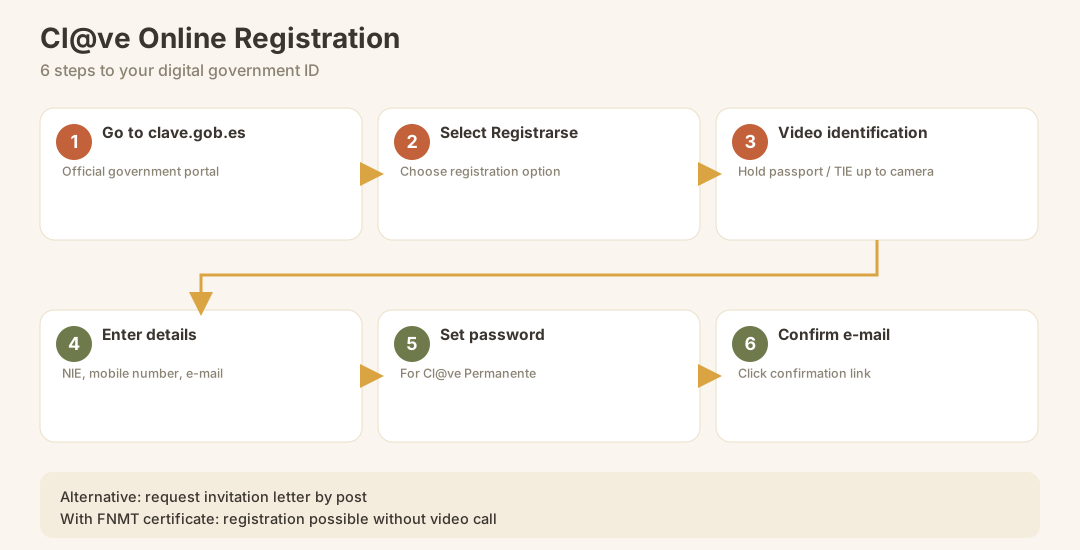
- Go toclave.gob.es — the official portal of the Spanish government
- Select "Registrarse" and choose your preferred registration option
- Start the video identification — you carry out a short video call during which you hold your passport or TIE card up to the camera
- Complete your details — enter your NIE, contact details, Spanish mobile number, and email address
- Set your login credentials — choose a secure password for Cl@ve Permanente
- Click the confirmation link sent by email and complete the registration
Alternatively, you can register byinvitation letter: you request a letter online, which is sent to your registered address and contains an activation code. This method takes longer, but is useful if the video identification fails due to technical issues.
Please note: Anyone who already holds a valid FNMT digital certificate can use it to register for Cl@ve directly, without a video call — the quickest route for more experienced users.
In-person registration on Mallorca and the Balearic Islands
If online registration does not work — for instance because the video identification fails due to a poor connection, or you simply prefer a more reliable approach — in-person registration is the most dependable option.
| Registration office | Address / Contact | Note |
|---|---|---|
| Agencia Tributaria (AEAT) Palma | Various offices in Palma de Mallorca | Appointment recommended; bring NIE + passport |
| Seguridad Social (TGSS) Palma | Main office in Palma | In-person registration possible |
| Registry Offices of the Balearic Government | Red de Oficinas de Asistencia en Materia de Registros del Govern de les Illes Balears | List available on the CAIB website |
| Health Centres (Centres de Salut) | Via Infosalut Connecta: 971 220 000 | Registration possible by phone |
You will generally need to bring: your NIE number, a valid passport and/or TIE card. Without a prior appointment, waiting times can be considerable — check the relevant authority's website in advance for current appointment booking systems.
What you can (and cannot) do with Cl@ve
This is where misunderstandings are particularly common: Cl@ve is powerful, but not all-powerful. Knowing its limitations will help you avoid nasty surprises just before important deadlines.
| Process | Cl@ve PIN | Cl@ve Permanente | FNMT certificate required |
|---|---|---|---|
| View tax status / Modelos | ✅ | ✅ | ❌ |
| Social security information | ✅ | ✅ | ❌ |
| Check foreign nationals file (Extranjería) | ✅ | ✅ | ❌ |
| Doctor's appointment / health portal | ✅ | ✅ | ❌ |
| Submit tax return (Modelo 100) | limited | ✅ | recommended |
| Sign documents with legal validity | ❌ | ❌ | ✅ |
| Grant gestor digital power of attorney (Apoderamiento) | ❌ | ❌ | ✅ |
| Use DEHú notifications to their full extent | ❌ | limited | ✅ |
| Business / autónomo procedures | ❌ | limited | ✅ |
In short: Cl@ve Permanente is sufficient for everyday queries and most procedures for private individuals. Anyone who is self-employed, runs a business, or wishes to grant their tax adviser digital power of attorney cannot avoid the FNMT digital certificate. Find out everything you need to know in our guide to Certificado Digital & Cl@ve.
Cl@ve vs. FNMT digital certificate: making the right choice
Almost every newcomer asks this question — and the answer depends on your personal situation.
Cl@ve Permanente is sufficient if you:
- Live in Spain as an employee or pensioner
- Occasionally need to access tax, social security, or official records
- Don't yet have an FNMT certificate and want to get started quickly
You additionally need the FNMT digital certificate if you:
- Are self-employed (autónomo) or operating as a business
- Want to grant your gestoría digital power of attorney (Apoderamiento)
- Need to sign official documents electronically
- Want to use the full DEHú notification service
Note: For the self-employed on Mallorca, the FNMT certificate is de facto mandatory. Find out more in our guide to being an autónomo in Spain.
The FNMT certificate is applied for at sede.fnmt.gob.es : first request a confirmation code by email, then verify in person at a registration office within 30 days, and finally download and install it in your browser.
The Cl@ve app: using Cl@ve PIN on mobile
The Spanish government provides an official app called "Cl@ve PIN" (available on the App Store and Google Play). It is particularly handy if you prefer to receive PINs via the app rather than by SMS — for example, because mobile reception in the island's interior can be unreliable.
Once registered, you can use the app to:
- Generate one-time codes for Cl@ve PIN
- Track the code's validity period (10 minutes) in real time
- Enter the code directly when logging in to official government portals
Important: Only generate the PIN code once you are actually on the relevant government portal and ready to log in. After 10 minutes it expires irrevocably and you will need to request a new one.
The most common mistakes when registering for Cl@ve
From the experience of Mallorca residents, we know these recurring stumbling blocks:
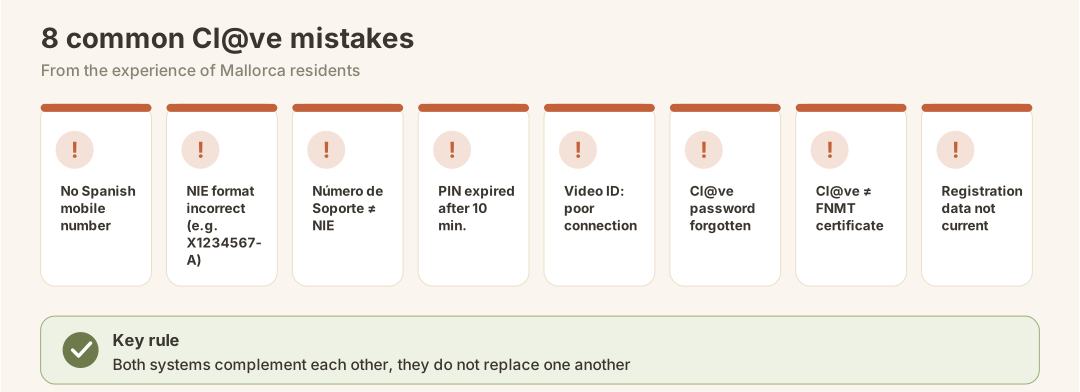
- No Spanish mobile number — foreign numbers are not always accepted; get a Spanish SIM card beforehand
- NIE number entered incorrectly — the format must be exact (letter + 7 digits + letter, e.g. X1234567A)
- Número de Soporte confused with NIE — this is not the NIE, but the printed card number on your TIE
- PIN expired after 10 minutes — generate the code, then use it immediately
- Video ID verification fails due to poor connection — choose a stable Wi-Fi connection or register in person
- Cl@ve Permanente password forgotten — resetting requires re-identification; write it down somewhere safe
- Confusing Cl@ve with the FNMT certificate — both systems complement each other, but neither replaces the other
- Registration details not up to date — make sure your Empadronamiento is up to date before requesting an invitation letter
Cl@ve and taxes: what you can actually do with it
For residents on Mallorca, the connection between Cl@ve and tax matters is particularly relevant. With Cl@ve Permanente you can, via the Agencia Tributaria:
- View your current tax status (datos fiscales)
- Retrieve submitted Modelos and review payment histories
- Check deadlines and notifications in your electronic mailbox
- Submit your income tax return (Modelo 100) in straightforward cases
For more complex tax steps — such as the Modelo 720 (declaration of assets held abroad) or working with a tax adviser via Apoderamiento — the FNMT certificate is essential. For a comprehensive overview of your tax obligations as a resident, see our guide to taxes as a resident (IRPF).
What comes next? Further steps with the authorities after Cl@ve registration
Once Cl@ve is set up, many further administrative processes become available to you online. A typical sequence for newcomers to Mallorca:
| Step | What you do | Relevant guide |
|---|---|---|
| 1 | Apply for NIE | NIE number Mallorca |
| 2 | Empadronamiento (registration of residence) | Empadronamiento Mallorca |
| 3 | Register Cl@ve PIN / Permanente | this guide |
| 4 | Apply for Residencia (EU citizens) | Residencia Spain |
| 5 | Install FNMT digital certificate | Certificado Digital |
| 6 | Clarify tax liability / IRPF | Taxes as a resident |
A professional Relocation Service on Mallorca can coordinate these steps and save you a great deal of time and stress, especially during the first few months.
Checklist: Setting up Cl@ve PIN and Permanente
Use this checklist to make sure you don't miss a single step:
- NIE number available and format checked
- TIE card or passport to hand
- Número de Soporte (TIE card number) noted down
- Spanish mobile number active and ready to receive messages
- Email address accessible
- Stable internet connection ensured for video ID
- Decided: online registration or in person?
- For in-person registration: appointment booked at AEAT or Seguridad Social Palma
- Cl@ve PIN app downloaded from the official app store (optional but recommended)
- Password for Cl@ve Permanente saved securely
- Need for FNMT digital certificate checked (autónomo? Powers of attorney? Signatures?)
Conclusion
Cl@ve PIN Spain is not a nice-to-have — it is your digital key to a large part of Spanish public administration. Registration typically takes less than an hour, yet saves you dozens of in-person trips to government offices throughout the year. The crucial point: understand from the outset the difference between Cl@ve (for authentication and enquiries) and the FNMT digital certificate (for signatures and powers of attorney) — and you will be prepared for every situation as a Mallorca resident. Once you have set up both, you are fully empowered to act digitally with Spanish authorities: from your tax return to pension information to your foreigners' file.
Official Sources
- Cl@ve Portal (official registration): https://clave.gob.es/
- Apply for the FNMT digital certificate: https://www.sede.fnmt.gob.es/certificados/persona-fisica
- Agencia Tributaria (AEAT) — Sede Electrónica: https://sede.agenciatributaria.gob.es/
- Seguridad Social — Sede Electrónica: https://sede.seg-social.gob.es/
- CAIB — Atención Ciudadanía / Cl@ve Balearic: https://www.caib.es/sites/atenciociutadania/es/clave
- Cl@ve PIN App (official): https://clave.gob.es/en/clave-movil/app-clave